


lans.cloud Tools

Rigged Coin Flip — Always Heads (or Tails)

Free rigged coin flip: a coin that always lands on heads — or tails — because where you tap the flip button secretly decides the result. Looks completely fair to everyone watching. Win every toss, then reveal the gag.

Was this tool helpful?
Support this site

More tools

How to rig a coin flip and still look fair

Nothing here is random unless you want it to be. Two of the three zones are yours, and the third is a genuine coin flip.

  1. Learn the three zones on the flip button

    The button is split invisibly into three zones: the left 40% gives Heads, the right 40% gives Tails, and only the middle 20% is up for grabs. Where your thumb lands is the whole trick, with one exception: an armed keyboard preset outranks the tap zone.

    The coin and the flip button as the tool loads, with nothing on screen to hint that the button is divided into zones
  2. Decide what the middle does

    Set "Middle of the button" to Heads, Tails, or Fair 50/50. Fair means the middle really is random, which is what makes the coin survive inspection: someone who taps dead centre gets a genuine coin flip.

    The middle-of-the-button control with Heads selected, beside the Tails and Fair 50/50 options
  3. Turn on practice mode and rehearse

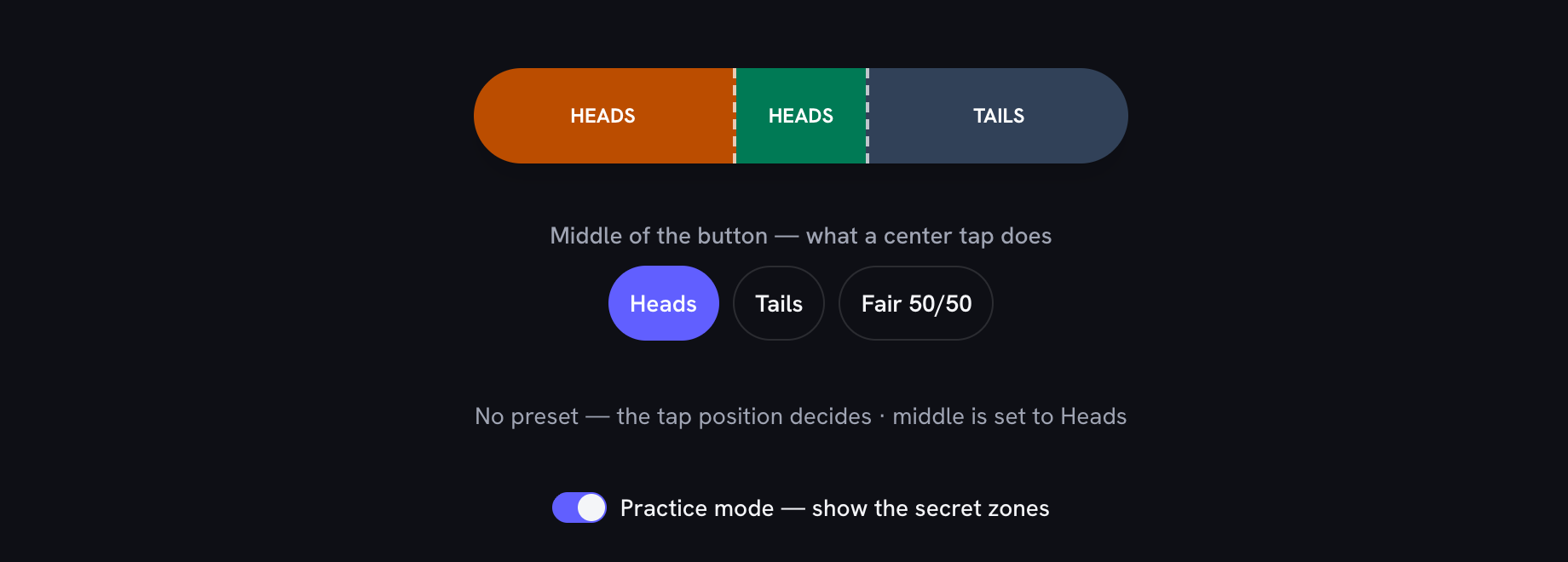
    Switch practice mode on to see the secret zones drawn on the button, then flip a few times until hitting the end you want is automatic. Aim well inside an end rather than near a boundary.

    Practice mode on: the flip button painted with a wide amber Heads zone, a narrow middle zone and a wide slate Tails zone, with a line below confirming the middle is set to Heads
  4. Switch practice mode off before anyone watches

    Practice mode draws the zones on screen, so turn it off, then tap Fullscreen, which hides the instructions and the middle-of-the-button control and leaves nothing but the coin. Two things worth knowing: a keyboard press has no tap position, so it follows whatever the middle is set to rather than being automatically fair, and Fullscreen forces the middle back to Fair while you are in it.

    Fullscreen mode: just the coin and the flip button on a clean screen, with the practice zones, the instructions and the middle-of-the-button control all gone

The Coin Flip You Can’t Lose

To everyone watching, this is a normal online coin toss: a satisfying 3D coin, a big flip button, heads or tails. What they don’t know is that the button itself is the controller. Tap its left side and it is a coin flip that always lands on heads — every single time, nothing to switch on first. Tap the right side and it always lands on tails. Tap dead center and the flip is genuinely random, which is exactly how you “prove” the coin is fair before the toss that decides who does the dishes — at least until you re-aim that middle strip yourself, which is the third trick below.

On a laptop there’s a second method: press H or T before the flip to preset the next result (and F to clear it). Presets are one-shot — they decide exactly one flip and vanish, so an over-the-shoulder observer replaying your moves finds nothing. A nearly invisible dot confirms your preset is armed; to everyone else it reads as a decoration.

Rather not rely on finger placement at all? The middle of the button is the honest strip, and the visible Middle of the button control decides what that strip does. Leave it on Fair 50/50 and a center tap is a real coin toss — the one you offer when someone asks to check. Set it to Heads or Tails and center taps land your way instead, as do keyboard flips, which carry no tap position at all: press Enter on the flip button and the coin obeys the setting. It remembers your choice for next time, the secret edge zones still outrank it on any tap that reaches them, and fullscreen presentation mode ignores it entirely — so a setting you forgot about can never hijack a live performance.

Running the Con (Kindly)

The routine that lands best: check the middle is on Fair 50/50 (it remembers what you set last visit), then offer a couple of center taps first and let the results scatter — the mark sees a fair coin. Then, when the real stakes arrive (“loser buys coffee”), tap your side. Win two or three in a row, watch the suspicion grow, and reveal the gag before it stops being funny — show them the practice mode overlay and let them rig a flip against the next friend. Like every prank here, the reveal is the actual punchline.

Practice Mode and Fullscreen

Practice mode paints the secret zones straight onto the button — amber for the heads zone, a narrow middle strip labelled with whatever you have pointed it at, slate for tails — and spells out in words whatever is armed. Rehearse until your taps look careless. Before an audience arrives, switch it off, or hit the fullscreen button: it hides this article, the cheat sheet, and everything else that could spoil the trick.

When You Need a Fair Coin

Sometimes you actually need an honest answer. Our regular coin flip is exactly that — a true 50/50 with streak stats. Choosing between more than two options? Spin the wheel or roll the dice. And for more two-person cons, the mind reading prank and fake lie detector use the same accomplice playbook — all collected on the prank & gag tools hub.

The secret controls cheat sheet

What you doWhat the coin doesWhat others see
Tap the LEFT 40% of the flip buttonHeads — guaranteedThe audience just sees you tap the button
Tap the RIGHT 40% of the flip buttonTails — guaranteedSame innocent tap, opposite result
Tap dead centerWhatever the middle is set to — a genuine 50/50 by defaultUseful to "prove" the coin is fair before the con
Set "Middle of the button" to Heads or TailsCenter taps and keyboard flips land thereThe one control your audience can see — the edge zones outrank it
Press H (keyboard)The next flip lands headsOne-shot preset — wins over the tap position, then clears
Press T (keyboard)The next flip lands tailsOne-shot preset — wins over the tap position, then clears
Press F (keyboard)Clears any presetBack to the tap zones (and whatever the middle is set to)

Derived from the same zone boundaries and key bindings the coin runs on — the table can never drift from the trick.

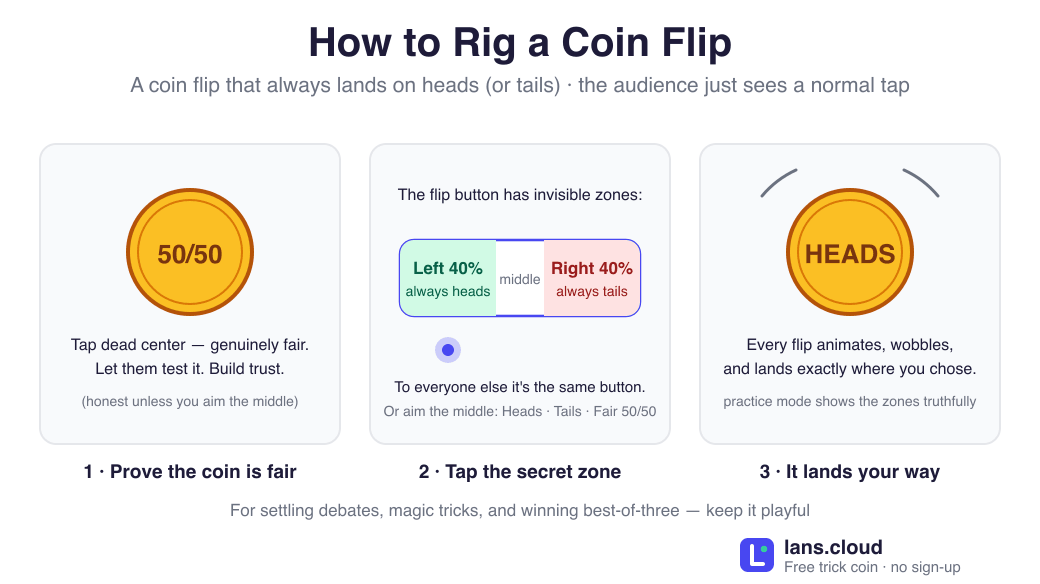
Diagram of how to rig a coin flip in three steps: prove the coin is fair with a center tap, which is genuinely random until you aim the middle yourself, tap the invisible secret zone (left 40% of the flip button always lands heads, right 40% always tails), and the animated coin lands your way — plus the visible control that re-aims the middle of the button at heads or tails.
The trick in one picture — edge taps decide the result, and the middle is honest until you aim it yourself.Download PNG

Frequently Asked Questions

How do you make a coin flip always land on heads?

On this page: tap the LEFT side of the flip button. The coin plays the same 3D animation as a fair toss and lands heads every time. Tap the right side for tails, or dead center for a genuinely random flip — handy for "proving" the coin is fair before the bet that matters. That middle strip stays honest unless you aim it yourself.

Is there a coin flip that always lands on heads?

Yes — this one. Tap the left side of the flip button and it is a coin flip that always lands on heads, every single toss, while looking completely fair to everyone watching; the right side is the exact mirror, a coin flip that always lands on tails. Those two zones need nothing switched on first. The middle of the button is the honest strip, and the visible "Middle of the button" control decides what a center tap does there: leave it on Fair 50/50 for a genuine toss, or point it at Heads so even a center tap lands your way.

How does a trick coin work?

A real trick coin is usually two-headed (or two-tailed), so it can only ever land one way. This trick coin gives you the same thing in three strips of one button. Its left 40% is always heads and its right 40% is always tails, so every steered toss looks like an ordinary tap. The middle fifth obeys the visible "Middle of the button" control, so pointing that at Heads makes even a center tap (and any keyboard flip, which has no tap position) land heads, with no finger placement at all. On a keyboard, H and T preset a single flip outright. Set it back to Fair 50/50 for a genuine toss. Better than a physical trick coin from a magic shop, which anyone can expose by looking at both sides.

Is the Google coin flip rigged?

No — Google’s built-in "flip a coin" widget is a fair random 50/50, and no setting changes that. If what you actually want is a coin flip you can secretly control, that is exactly what this page is: the same fair-looking 3D toss, except the side of the button you tap decides the result.

Is this coin flip rigged?

Only if you rig it. Out of the box every flip is a fair, unbiased 50/50. But where you tap the flip button steers the result — the left side always lands heads, the right side always lands tails — and the visible "Middle of the button" control decides what the honest middle strip does. Leave that control on Fair 50/50 and tap dead center whenever you need an honest result.

Can people tell the coin flip is rigged?

Not from watching. The animation, timing, and result screen are identical whether a flip was rigged or random — what decides it is where your finger touched the button, and nobody tracks that. The one giveaway is a tiny colored dot that appears when a keyboard preset is armed (so YOU know it worked); it looks like a design detail.

Is this coin flipper ever actually random?

Yes — while the "Middle of the button" control sits on Fair 50/50, which is how it starts, the middle fifth of the button is a true 50/50 from an unbiased random number generator, and keyboard-triggered flips with no preset are fair too. Point that control at Heads or Tails and those same two cases follow it instead — the edge zones are unaffected either way, since they were never random. If you want a coin that is always fair, use our regular coin flip instead.

How do I practice the trick without getting caught?

Turn on practice mode: it overlays the secret zones on the button and narrates what is armed. Rehearse until tapping the correct side feels natural, then switch practice mode off — or go fullscreen, which hides everything except the coin.

What should I use a rigged coin flip for?

Comedy, not contracts. Win who-does-the-dishes three times running, then reveal the gag — the reveal IS the joke. Don’t use it where people genuinely rely on a fair result; for that, use the honest coin flip and settle it properly.

Rigged coin flip showing the coin with practice mode revealing the secret heads and tails zones on the flip button, with a middle strip showing its current setting between them
Practice mode reveals the secret zones — left of the button is always heads, right is always tails.