lans.cloud Tools

Equal Playing Time Calculator

Free equal playing time calculator for youth sports: enter players present, players on the field, and game length — get a substitution rotation where everyone plays exactly the same minutes.

Quick answer

Multiply the game length by the number of players on the field, then divide by your squad size. With 10 players, 7 on the field and a 60-minute game: 60 × 7 ÷ 10 = 42 minutes each. Enter your numbers and the calculator gives the per-player minutes plus the exact substitution schedule that delivers them fairly.
Was this tool helpful?
Support this site

More tools

How to calculate equal playing time

Fair minutes for every player in three steps — set it up once, run it from the sideline.

  1. Enter your game and roster

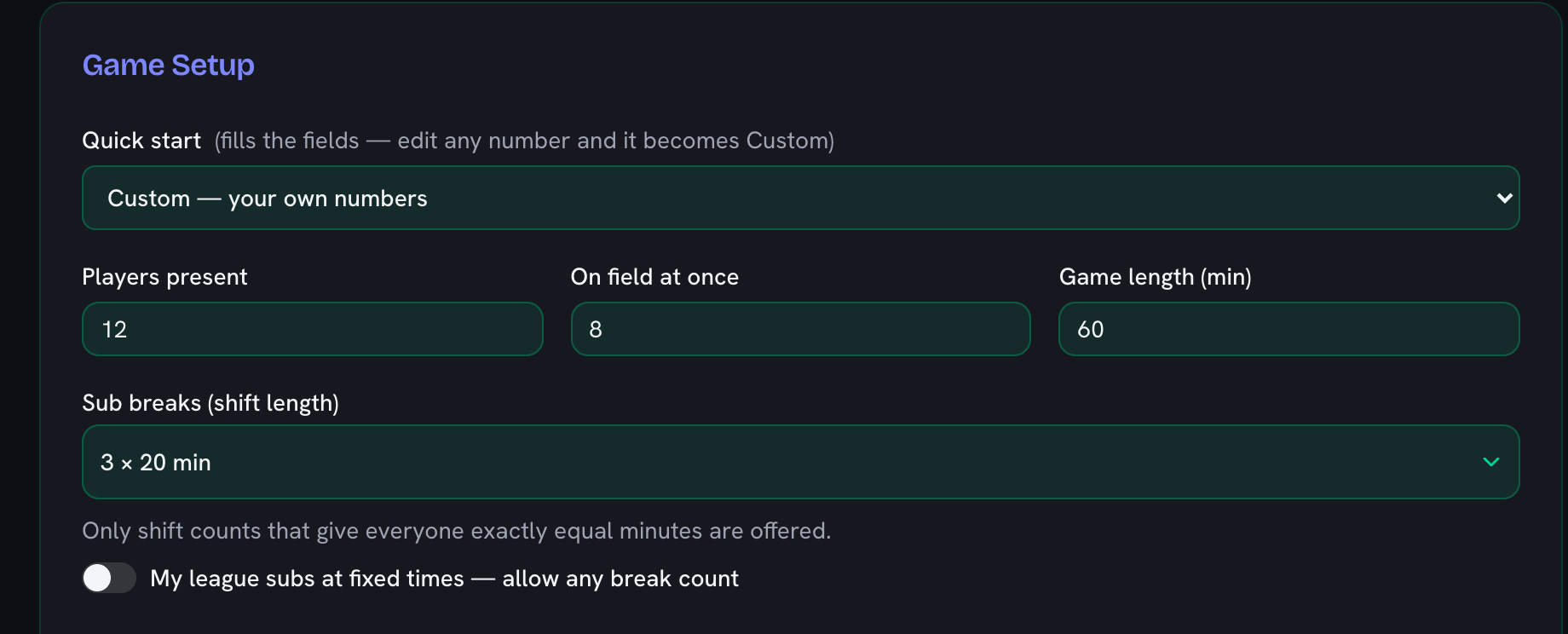
    Set the game length in minutes, how many players are on the field at once, and how many players are present. That is everything the fair-minutes math needs.

    The setup card filled in for a squad of 12 with 8 on the field and a 60-minute game, and the shift length set to three 20-minute blocks
  2. Get a fair rotation

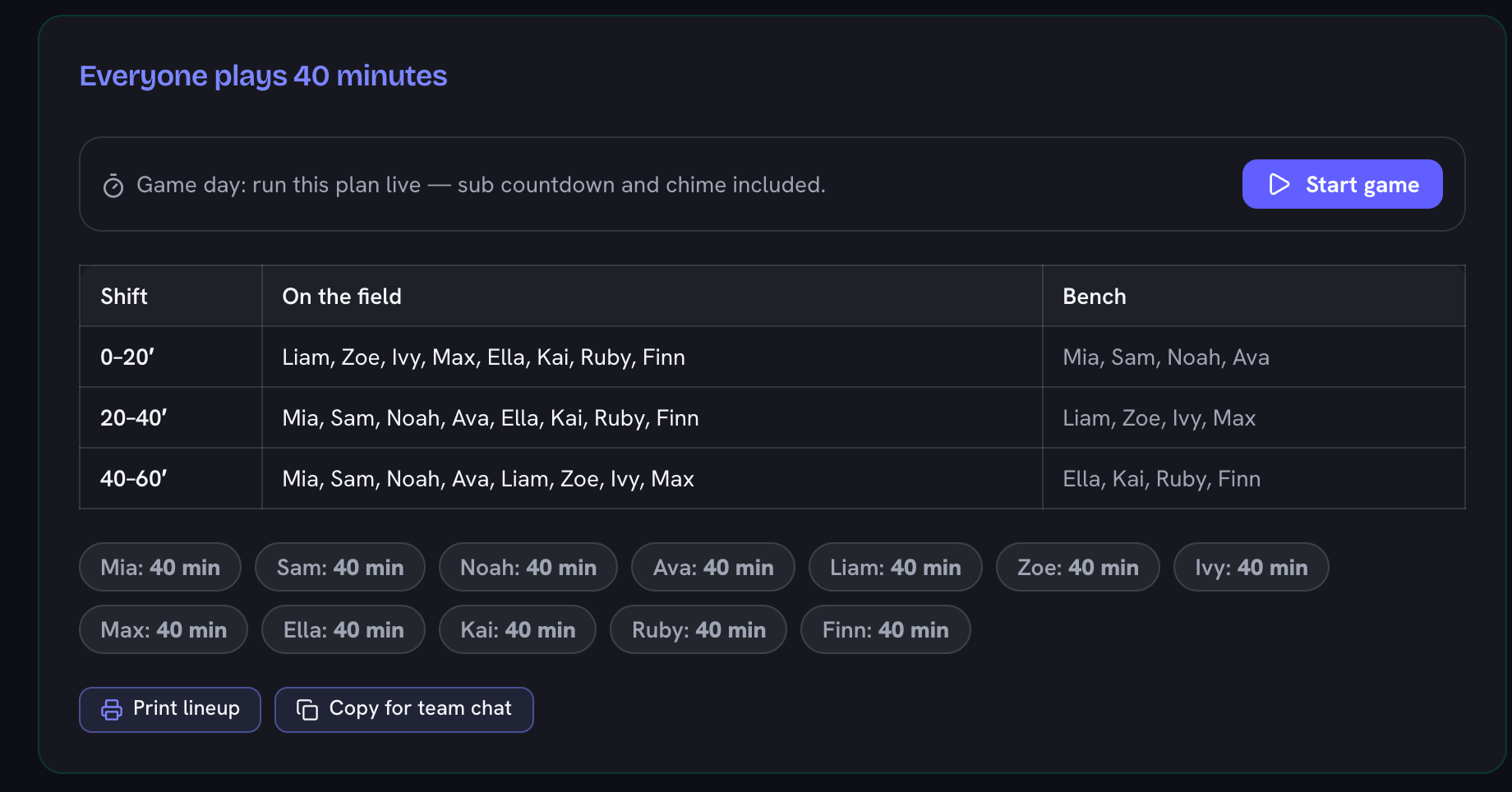
    The calculator builds a substitution schedule that gives every player as close to equal minutes as the numbers allow, and names exactly who is on and who is resting in each block.

    The rotation for that squad: three shifts naming who is on the field and who is on the bench, with a pill per player showing 40 minutes each
  3. Run it or print it

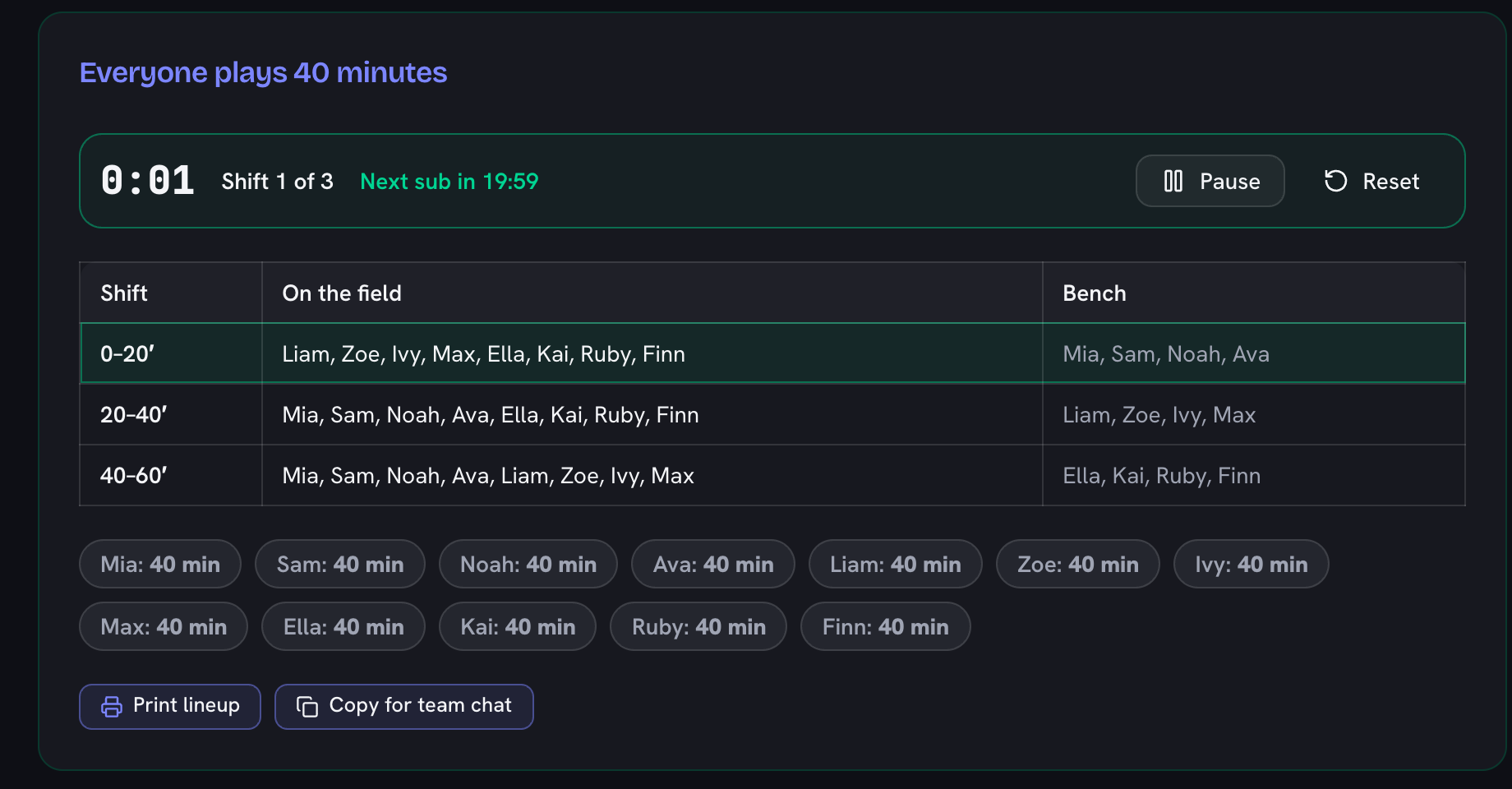
    Start the live game clock that tells you when to make each sub, print the lineup sheet for the sideline, or copy it for the team chat. Save your squad and it loads back next week.

    The live game clock running, showing shift 1 of 3 and the countdown to the next sub, with the current shift highlighted in the table

Fair Minutes Without the Spreadsheet

Every youth coach knows the post-game conversation to avoid: a parent, a stopwatch, and a child who sat too long. Equal playing time is usually a league rule and always good development practice — but juggling it live, while actually coaching, is how it goes wrong. This calculator doubles as a substitution schedule maker: it produces the whole plan before kickoff — who starts, who comes on at every break, and the exact equal minutes everyone ends up with.

The rotation uses a simple round-robin: each shift, the next group in roster order takes its turn on the bench. Because the calculator only offers shift counts where the bench cycles through the roster completely, the fairness is mathematical, not approximate — no solver, no near-enough.

Typical Youth Formats

Equal minutes in common youth formats

FormatMinutes per playerSimplest fair rotation
Soccer 5v5 (U8), 8 at the game25 min8 shifts of 5 min
Soccer 7v7 (U10), 10 at the game35 min10 shifts of 5 min
Soccer 9v9 (U12), 12 at the game45 min4 shifts of 15 min
Soccer 11v11, 15 at the game51.3 min15 shifts of 4.7 min
Basketball 5s, 8 at the game20 min8 shifts of 4 min
Basketball 5s, 10 at the game16 min2 shifts of 16 min
Volleyball 6s, 9 at the game40 min3 shifts of 20 min
Flag football 5v5, 9 at the game22.2 min9 shifts of 4.4 min
Netball 7s, 10 at the game42 min10 shifts of 6 min

Computed by the same engine as the calculator — pick more shifts above for shorter, more frequent rotations.

Coaching With the Rotation

Print the table or keep the sideline fullscreen open on your phone. Two practical tips: first, enter names in roster order and tell the players their number — substitutions become “threes off, sixes on” instead of a negotiation. Second, if your league subs only at quarters or halves, switch on “My league subs at fixed times” and pick the break count that matches — the calculator then spreads the bench as evenly as the maths allows, shows the exact spread, and tells you which players get the extra shift — the honest way to rotate players evenly when the numbers don’t divide. Pair it with the random team picker for fair sides at training, or the team snack schedule generator for the other job that lands on the coach.
Frequently Asked Questions

How do you calculate equal playing time?

Multiply the game length by the number of players on the field, then divide by the players at the game. Ten players, seven on the field, 60 minutes: 60 × 7 ÷ 10 = 42 minutes each. The calculator does this and — the harder part — builds the actual substitution schedule that delivers it.

Why are only certain shift counts offered?

Perfect equality is only possible when the bench rotates through the whole roster a whole number of times. With 10 players and 7 on the field, 3 sit each shift, so equality needs a multiple of 10 shifts... the calculator computes the valid counts for your numbers so every option it shows is exactly fair.

Can I use this as a basketball rotation generator?

Yes — set 5 on court and your roster size and it generates the full rotation with equal minutes for every player. The math is sport-agnostic, so the same generator covers soccer, futsal, hockey, netball, volleyball (rotate at set breaks), flag football, or anything with interchangeable substitutions.

Can I use this as a game time calculator for football?

Yes — it works as a game time calculator for football and any sport with rolling substitutions: enter the players at the game, how many are on the pitch at once, and the match length, and it splits the total game time into an exact equal share per player, plus the substitution schedule that delivers it. The same works for basketball minutes or hockey shifts.

Our league subs at fixed times (quarters) — can it still be fair?

Yes — turn on "My league subs at fixed times" and pick any break count, including the 4 quarters many leagues mandate. When perfect equality is mathematically impossible with your numbers, the calculator builds the closest-possible rotation instead and says so honestly: every player is within one shift of everyone else, and the plan shows the exact spread (for example 30–36 minutes). Counts marked ✓ give perfectly equal minutes.

What about goalkeepers or players who should play more?

Pick a fixed goalkeeper in the setup and they stay on for the whole game while the rotation splits the outfield spots equally among everyone else — 12 players with a fixed keeper in 9v9 means the other 11 share 8 outfield spots. Beyond the keeper, the calculator treats everyone as interchangeable: that is the point of equal-time youth sports.

Can I print the rotation or send it to parents?

Yes — Print Lineup produces a one-page substitution schedule for the clipboard or touchline, and Copy for Team Chat puts the whole plan on your clipboard as plain text ready to paste into the parents’ group chat. Save your squad with My Teams and next week’s plan takes ten seconds.

Can I show the rotation on my phone during the game?

Yes — Sideline Fullscreen turns the schedule into a large, glare-friendly table with no ads, made to sit open on a phone or tablet at the touchline. Player names replace numbers if you enter your roster.

Is this a substitution schedule maker?

Yes — that is exactly what it builds. Enter your squad, how many play at once, and the game length, and it produces a full substitution schedule: a shift-by-shift grid of who is on the field and who is on the bench, plus each player’s total minutes so you can see at a glance that the rotation is fair. Print it or copy it to the team chat, and it doubles as a youth sports sub calculator for any interchangeable-substitution sport.

How do I make a fair playing time rotation?

Work out how many bench spots there are each shift (squad minus players on the field), then rotate the whole roster through the bench in order so nobody sits more often than anyone else. This tool does that round-robin for you and only offers shift counts where the bench cycles through the roster a whole number of times, so the fair playing time rotation is exact rather than approximate. When your league fixes the sub times (quarters), turn on "My league subs at fixed times" and it builds the closest-possible split and tells you exactly who gets the extra shift.

How do you rotate players evenly across a game?

Divide the game into equal shifts and move the same number of players on and off at each break, cycling through your roster in a fixed order. Evenness comes from two things: equal minutes (everyone gets the same total time on the field) and evenly spread rest (nobody is benched twice before someone else is benched once). The generator guarantees the first and, because it rotates in roster order, keeps the second as even as the numbers allow — and shows every player’s minutes so you can prove it to a parent.

Is there a substitution timer that runs during the game?

Yes — press Start Game and the plan runs live: a running game clock, the current shift highlighted in the table, a countdown to the next substitution, and a three-note chime at every sub (plus a full-time signal at the end). Pause for half-time or stoppages and resume — the clock keeps its place, even if you switch to Sideline Fullscreen mid-game. Completed shifts fade so the current one is always obvious at a glance.

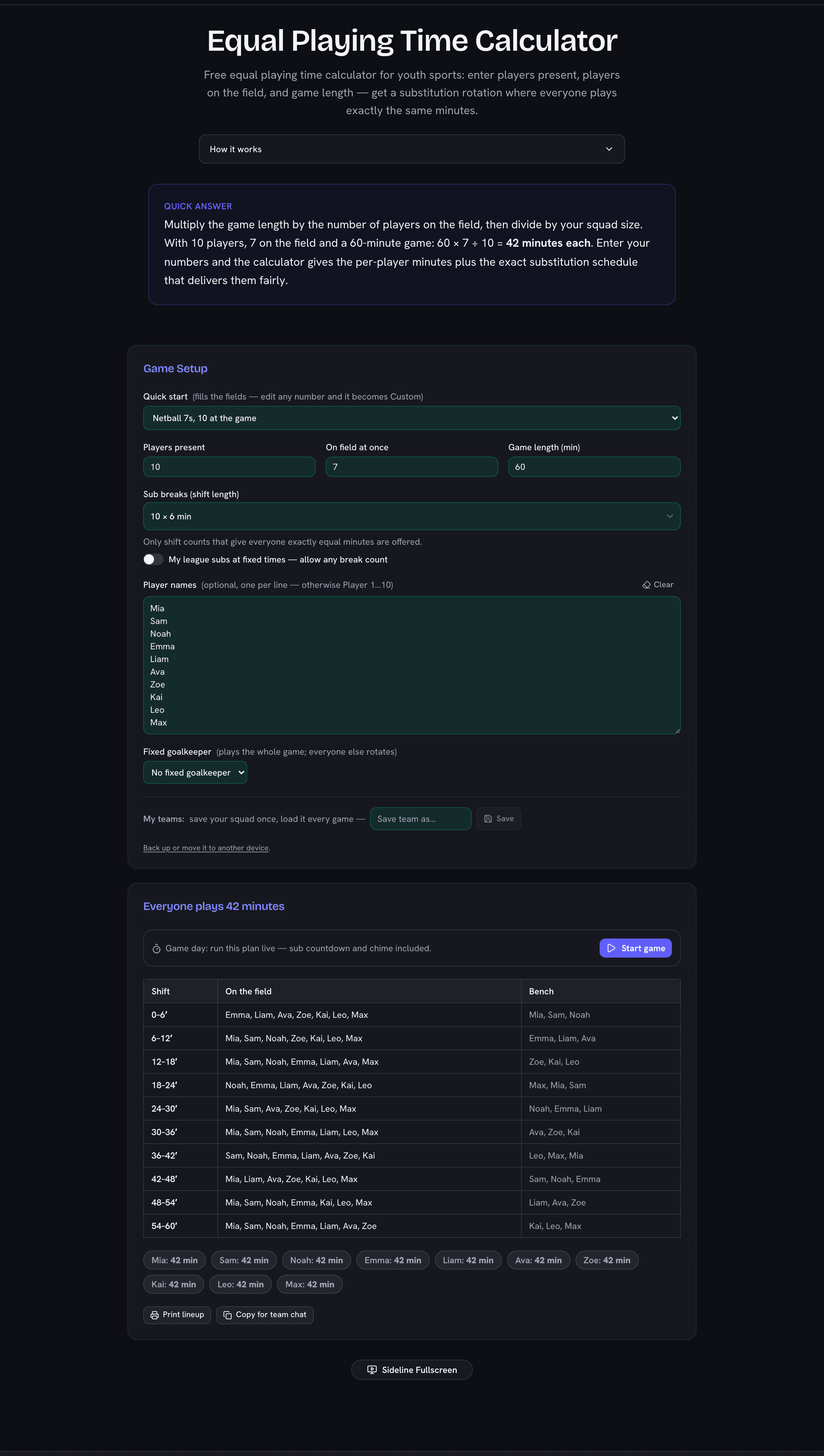
Equal playing time calculator showing a fair substitution rotation table with player names and shifts
Only mathematically fair rotations are offered — the table shows exactly who plays when.