What this bookbinding signature calculator does
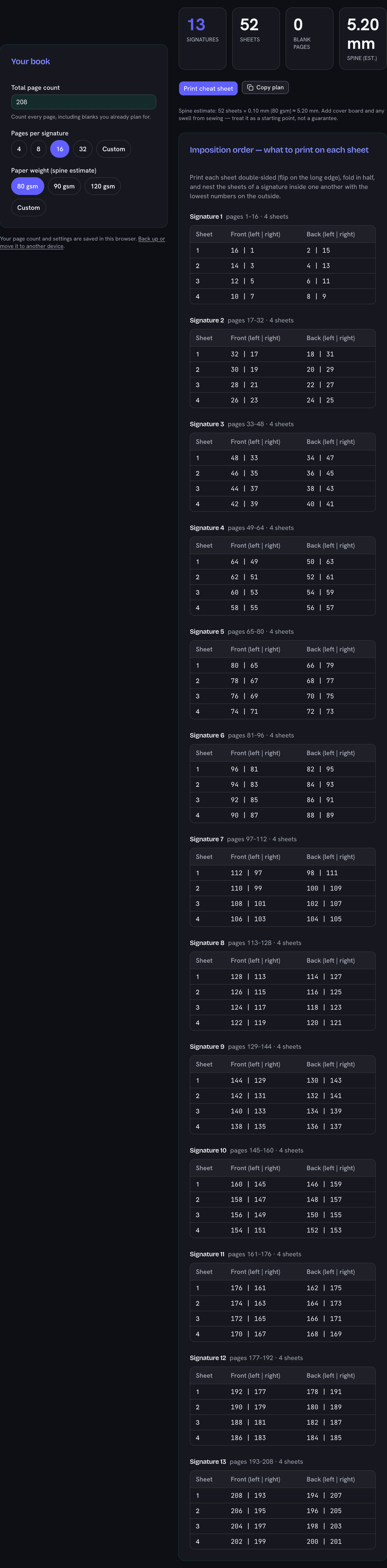
Give it a total page count and a signature size and it splits your book into signatures, works out the blank filler pages needed to fill the last fold, estimates the spine thickness from your paper weight, and — most usefully — prints the booklet page order for every physical sheet. That per-sheet book imposition is the part that trips up first-time binders: fold a stack of paper in half and the page numbers have to be printed out of order so they read correctly once folded and nested. This calculator does that arithmetic for you and hands you a cut sheet to take to the copy shop.
Signatures, sheets, and pages per signature
One sheet of paper folded once gives four pages (two on each side), so a signature is always a multiple of four. Sixteen and thirty-two are the common folds because they balance a comfortable stack thickness against the number of folds you have to sew. Choosing your pages per signature is a trade-off: bigger signatures mean fewer sewing stations but a thicker, harder-to-fold bundle; smaller signatures fold crisply but add sewing work. Whatever you pick, the tool reports how many signatures the book breaks into and how many sheets that is in total.
Blank pages and the last signature
Unless your page count divides evenly, the last signature will have a few blank pages. That is normal in bookbinding — the blanks become endpapers, a colophon, or simply breathing room. When the final signature would be more than half empty, the calculator offers to shrink it instead: the last fold drops to the smallest multiple of four that still holds your real pages, saving paper at the cost of one uneven signature. Both options are shown so you can decide.
Reading the imposition table
For each signature the table lists every sheet with the two page numbers to print on its front and the two on its back. This is the same order used for saddle stitch imposition and fanbinding: print double-sided, fold each sheet in half, and nest the sheets of one signature inside each other with the lowest numbers outermost. Do that signature by signature and the finished stack reads in order from page one.
Where a PDF imposer fits in
This is a calculator, not a PDF processor: it does the math and the cut sheet. If you would rather hand a printer a file whose pages are already rearranged into printer spreads, a dedicated PDF imposition app does exactly that — the two tools complement each other. Use this one to understand the plan, size the spine, and print the folding order; reach for a PDF imposer when you want the reordering done automatically inside the file.
Binding a book is one project in a larger making habit. If you keep a craft queue, the reading log generator tracks the books you fill these pages with, while the crochet yarn calculator and granny square blanket calculator do the same quantity math for yarn projects.