lans.cloud Tools

Minecraft Circle Generator

Free Minecraft circle generator. Block-by-block pixel circle charts for any diameter up to 128, ovals included, with block counts in stacks of 64, a copyable row-by-row build list, and PNG download.

Was this tool helpful?
Support this site

More tools

Build Perfect Circles in a World Made of Squares

Every Minecraft builder hits the same wall: the game only has square blocks, but towers, lighthouses, domes, fountains, and castle turrets all want to be round. This Minecraft circle generator solves it: enter any diameter from 1 to 128 blocks and get a pixel-perfect, block-by-block chart you can copy straight into your build, with a live count of how many blocks you will need.

Came for the numbers rather than the tool? Skip straight to the sizes chart: outline and filled block counts for every whole diameter from 3 to 36 blocks, and the landmark sizes beyond it.

Toggle Filled circle for solid discs (floors, ceilings, water features) or keep the outline for walls and rings. Unlock the aspect ratio and you have an oval generator too, perfect for elliptical ballrooms and stadium builds. The PNG download gives you a chart to keep on a second screen while you build.

How to Read the Chart In-Game

  1. Find your center or edge. Odd diameters center on one block; even diameters on a block boundary.
  2. Build one quadrant at a time. Circles are symmetric: copy the top-right quarter of the chart, then mirror it three times.
  3. Count the runs. Each row of the chart is a straight run of blocks. Place the run, step in or out as the chart does, and continue.
  4. Scaffold first for large circles. For 30+ block diameters, marking the cardinal extremes (top, bottom, left, right) first keeps the quadrants aligned.

Circle Sizes Builders Actually Use

Wizard towers and lighthouses: 9–15 blocks. Castle corner turrets: 7–11. Large keep towers and windmills: 17–25. Domes and arena walls: 31–64. At that scale the staircase steps smooth out and the shape reads as genuinely round. Above 64 you are in mega-build territory: the generator goes to 128 so even server spawn projects are covered.

The chart further down runs unbroken from 3 to 36 blocks, so a 13-block turret and a 14-block one get separate answers rather than the same rounded one, then jumps to the landmark sizes above that.

Works for Any Block Game or Pixel Art

The chart is plain geometry, so it works identically for Terraria, Roblox, LEGO builds, cross-stitch patterns, and pixel art: anywhere you need a circle out of square units.

Minecraft Circle Sizes Chart: Blocks Needed

Planning materials before you mine? Every whole diameter from 3 to 36 blocks gets its own row, so the size you already have in mind is in here instead of rounded to the nearest one somebody thought was popular. Past 36 it keeps to the round sizes people actually plan builds around, up to the generator’s ceiling of 128 blocks. Outline is a hollow ring (walls, towers); filled is a solid disc (floors, ceilings, ponds), and both columns come from the same algorithm as the generator above.
Blocks needed per circle diameter

DiameterOutline blocksFilled blocksFilled in stacks
3 × 3899 blocks
4 × 481212 blocks
5 × 5122121 blocks
6 × 6163232 blocks
7 × 7163737 blocks
8 × 8205252 blocks
9 × 924691 stack + 5
10 × 1028801 stack + 16
11 × 1128971 stack + 33
12 × 12321121 stack + 48
13 × 13361372 stacks + 9
14 × 14361562 stacks + 28
15 × 15401772 stacks + 49
16 × 16442083 stacks + 16
17 × 17482253 stacks + 33
18 × 18482564 stacks
19 × 19522934 stacks + 37
20 × 20563164 stacks + 60
21 × 21563495 stacks + 29
22 × 22603846 stacks
23 × 23644216 stacks + 37
24 × 24644487 stacks
25 × 25684897 stacks + 41
26 × 26725408 stacks + 28
27 × 27765779 stacks + 1
28 × 28766169 stacks + 40
29 × 298066510 stacks + 25
30 × 308471611 stacks + 12
31 × 318474911 stacks + 45
32 × 328881212 stacks + 44
33 × 339286113 stacks + 29
34 × 349691214 stacks + 16
35 × 359697315 stacks + 13
36 × 361001,02015 stacks + 60
40 × 401121,26419 stacks + 48
48 × 481321,80428 stacks + 12
50 × 501401,97630 stacks + 56
64 × 641803,22850 stacks + 28
96 × 962687,232113 stacks
100 × 1002807,860122 stacks + 52
128 × 12836012,892201 stacks + 28

Counts come from the generator's own rasterization. Odd diameters have a single centre block; even ones centre on a block boundary. The tool converts whichever shape you pick (outline or filled) into stacks of 64 live.

Minecraft Oval Generator: Ellipse Block Counts

Turn off Perfect circle and the same tool becomes an oval generator: set width and height independently, up to 128 × 128. Ovals read as more natural than circles for arena floors, elliptical ballrooms, racetracks, and stadium walls, and they cost far less than the circle that would contain them: a 32 × 16 oval outline is 68 blocks against the 88 a full 32 × 32 ring needs. This ladder keeps a 2:1 ratio; any other combination works in the generator above.

Blocks needed per oval size (2:1 ellipses)

Oval sizeOutline blocksFilled blocksFilled in stacks
16 × 8321001 stack + 36
20 × 10441602 stacks + 32
24 × 12522323 stacks + 40
32 × 16684046 stacks + 20
40 × 20886329 stacks + 56
48 × 2410490814 stacks + 12
64 × 321401,61225 stacks + 12
96 × 482123,62856 stacks + 44
128 × 642846,440100 stacks + 40

Same rasterizer as the circles above: an ellipse is what the generator draws whenever width and height differ. Unlock the aspect ratio in the tool to set any width and height up to 128.

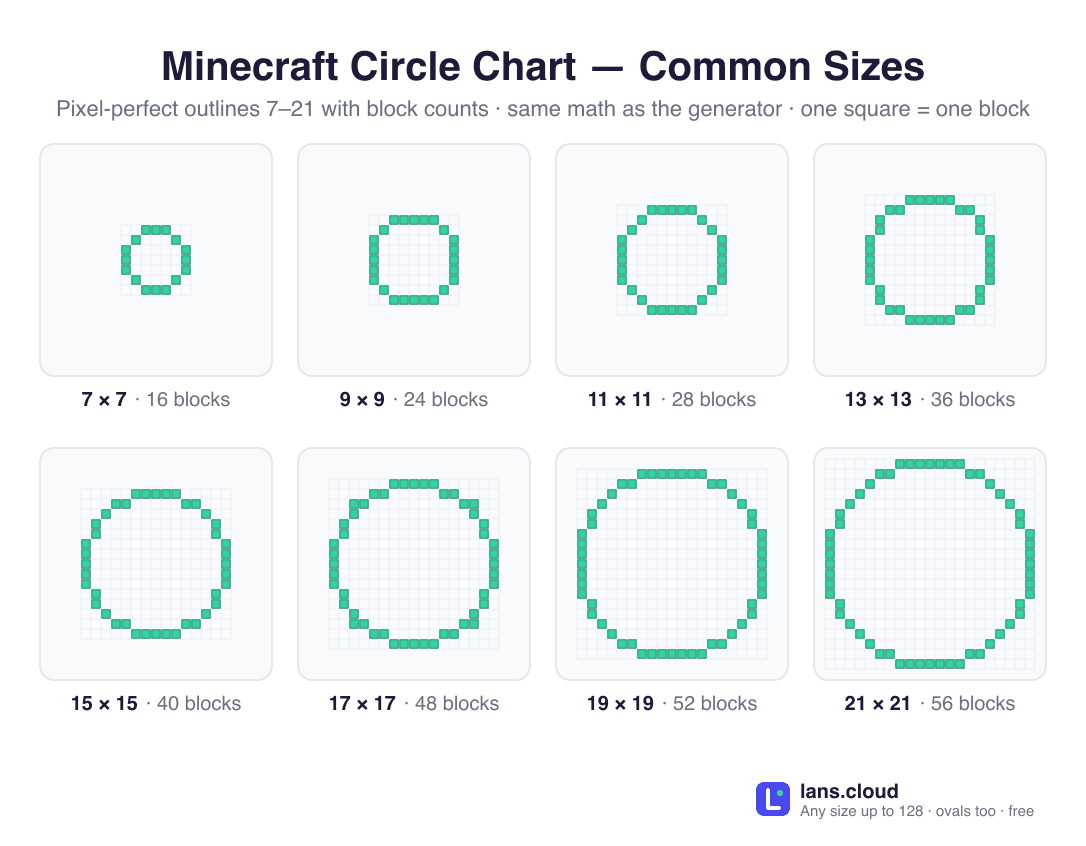
Minecraft circle chart showing pixel-perfect outline circles for the most common sizes (7×7, 9×9, 11×11, 13×13, 15×15, 17×17, 19×19, and 21×21 blocks), each on a block grid with its total block count, for building circular towers, walls, and farms.
The eight most-built circle sizes as one chart. Save or print it for your next build.Download PNG

How to make a circle in Minecraft

Turn a diameter into a round build in a world made of square blocks.

  1. Set the diameter

    Enter the diameter you want, from 1 to 128 blocks. Odd diameters give a single center block (good for towers around a beacon); even diameters center on a block boundary.

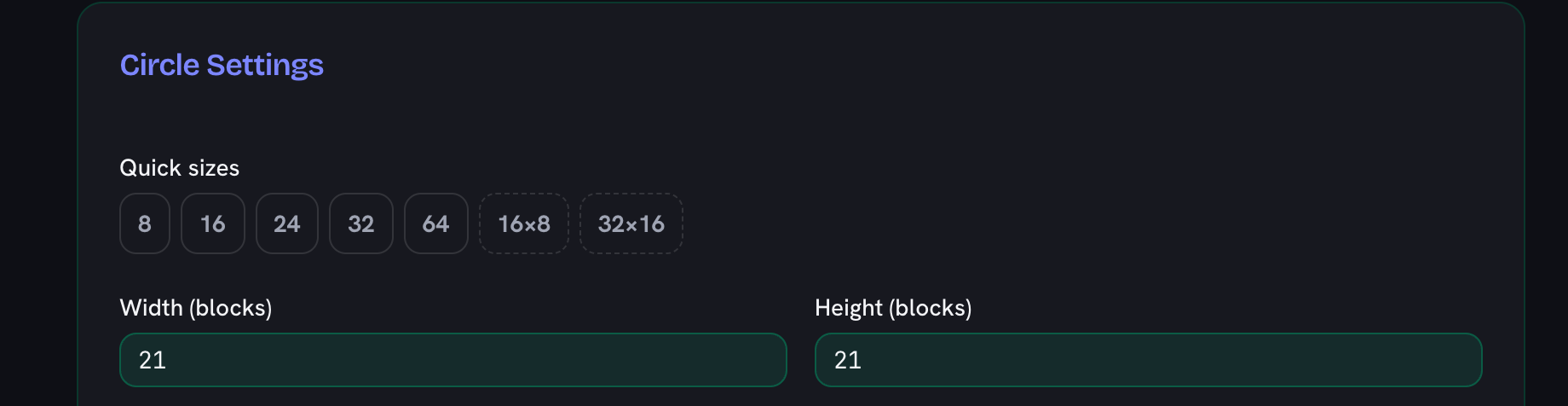
    The circle settings with the width and height boxes both set to 21 blocks, above the quick-size buttons
  2. Choose outline or filled

    Keep the outline for walls and rings, or turn on Filled circle for solid discs like floors and ceilings. Unlock the aspect ratio to make an oval instead.

    The two switches under the size boxes, with the filled-circle switch turned on for a solid disc
  3. Gather the blocks

    Read the live block count and its inventory-stack breakdown so you mine enough material before you start. Use Copy build list for a row-by-row placement plan.

    The live block count reading 349 blocks with its inventory-stack breakdown, above the download and copy-build-list buttons
  4. Build the bottom layer row by row

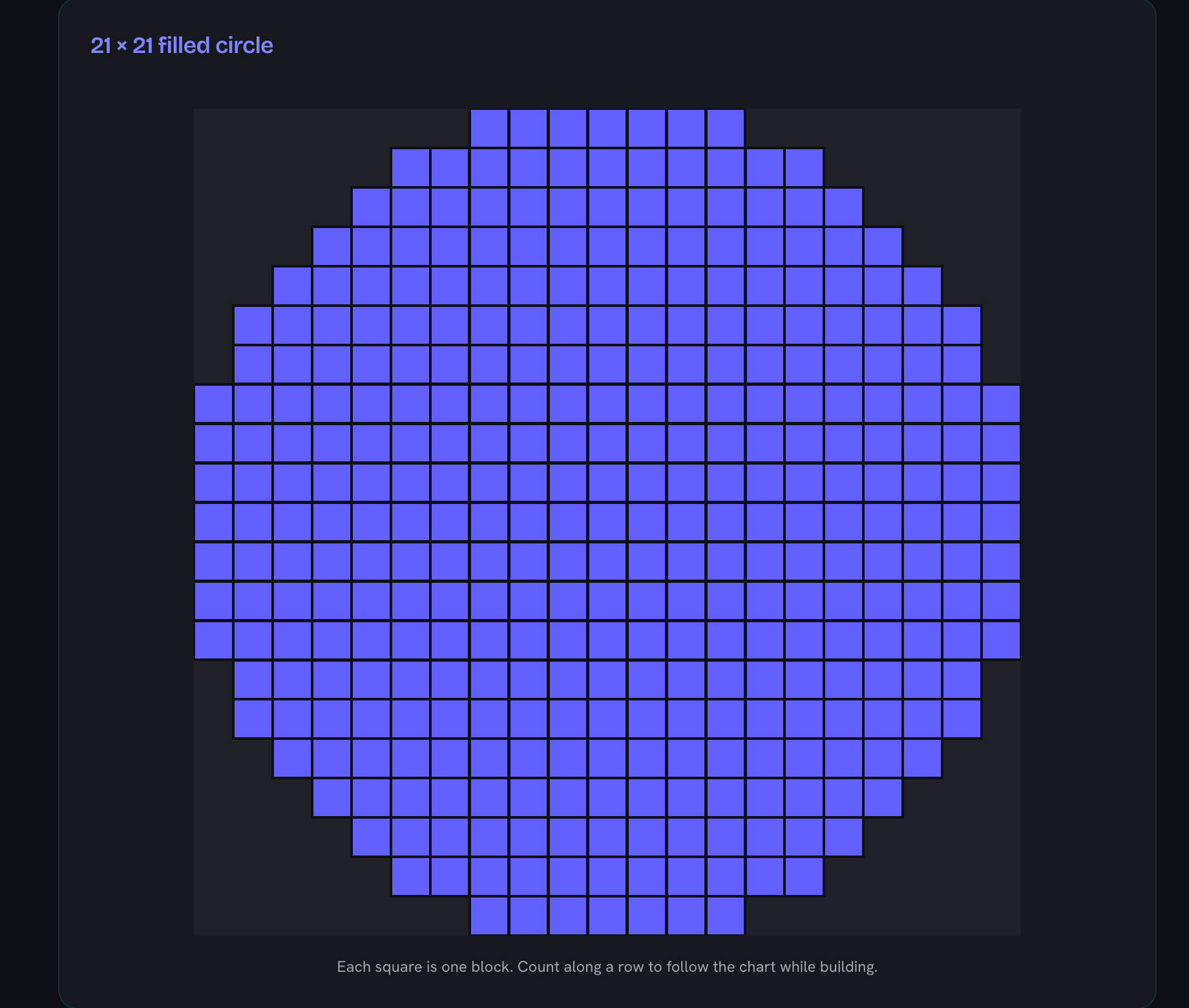
    Copy the chart one row at a time: each row is a straight run of blocks. Place the run, step in or out where the chart does, and continue around the shape.

    The 21 by 21 block chart, each square one block, with the rows stepping in and out around the edge of the disc
  5. Stack the layers

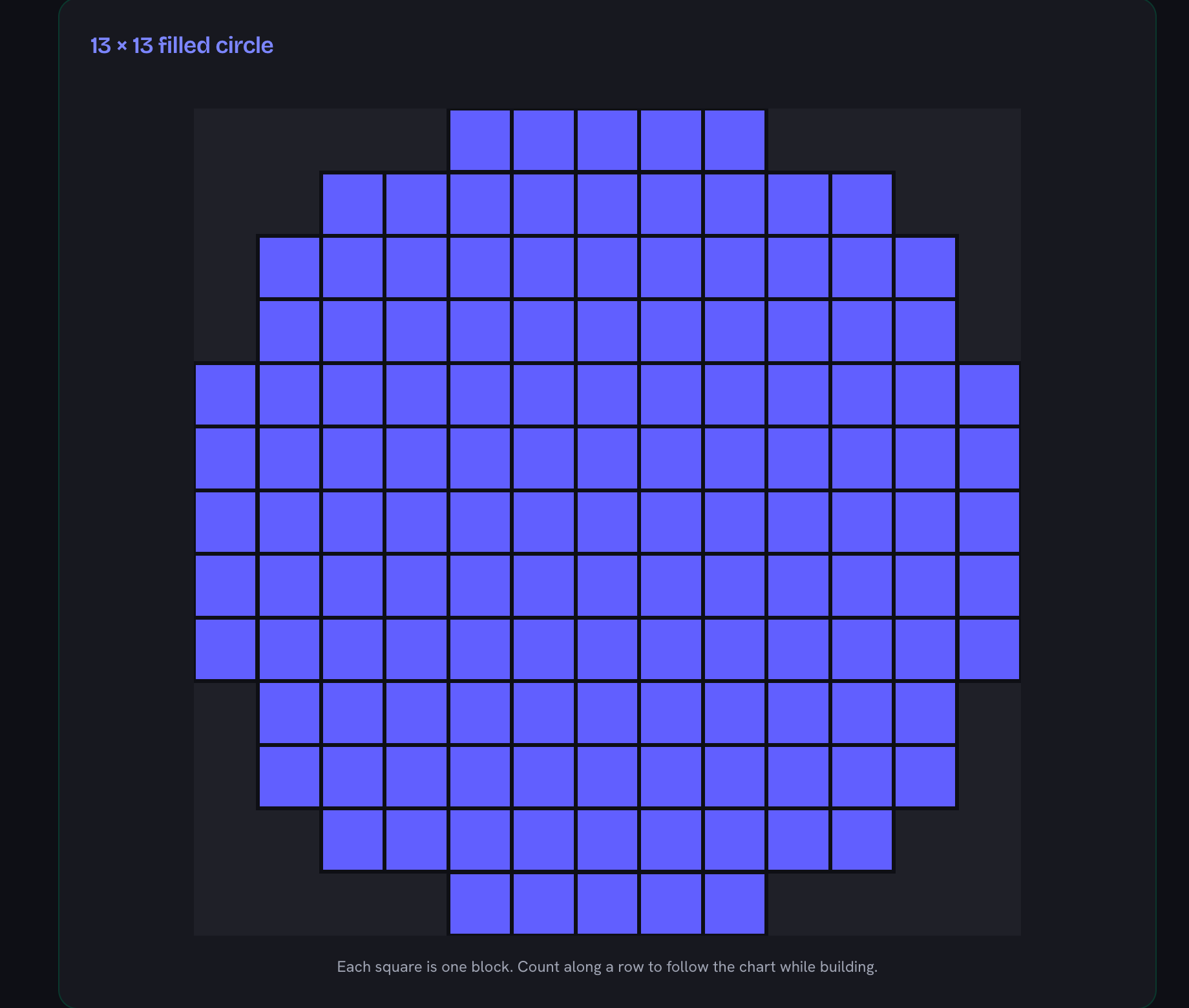
    For a tower or cylinder, repeat the same ring directly on top of itself for each block of height. For a dome, shrink to a smaller diameter as you rise.

    The same chart at 13 by 13 blocks, the smaller ring you would place on the layer above for a dome

Frequently Asked Questions

How do you make a circle in Minecraft?

Set the diameter in the generator, then copy the chart row by row in the game: count the highlighted blocks in each row of the chart and place the same run of blocks in your world. Because Minecraft is made of square blocks, a "circle" is really a staircase of straight runs, and the chart tells you exactly how long each run is.

What is a good circle size for a tower or lighthouse?

Diameters between 9 and 15 blocks make good towers: big enough to look round and fit stairs inside, small enough to build quickly. For larger builds like castles or domes, 21 to 31 blocks reads clearly as a circle from a distance.

Should I use an odd or even diameter?

Odd diameters (7, 9, 15…) have a single center block, which makes it easy to center the circle on a point, ideal for towers around a beacon or fountain. Even diameters center on the edge between two blocks, which suits builds aligned to a 2-block grid. The generator handles both.

What if I know the radius instead of the diameter?

Double it. The width and height boxes take diameters, so a radius of 5 means entering 11 or 10, and which one depends on where you measured from. Pace 5 blocks straight out from a center block (north, south, east or west, not diagonally) and the build is 11 across: the center column plus 5 either side. If instead your radius is half the total width, the way a circle gets measured on paper, enter 10; that one centers on the seam between the two middle rows instead of on a block. Radius 15 is the same choice one scale up: 31 across from a center block, or 30 as half the width. Both readings have a row in the chart.

Can it generate ovals and ellipses?

Yes. Switch off "Perfect circle" and set the width and height independently, up to 128 × 128 blocks, for oval rooms, stadium walls, and elliptical domes.

How many blocks do I need for my circle?

The block counter updates live for the exact shape shown (outline or filled) and converts to inventory stacks (a 137-block build reads “2 stacks + 9”). For big builds, Copy build list (or the .txt download) gives you the total plus row-by-row placement runs like “Row 4: 5 from col 9”: gather the stacks, follow the rows, no squinting at the chart mid-build.

How many blocks is a 15 block circle in Minecraft?

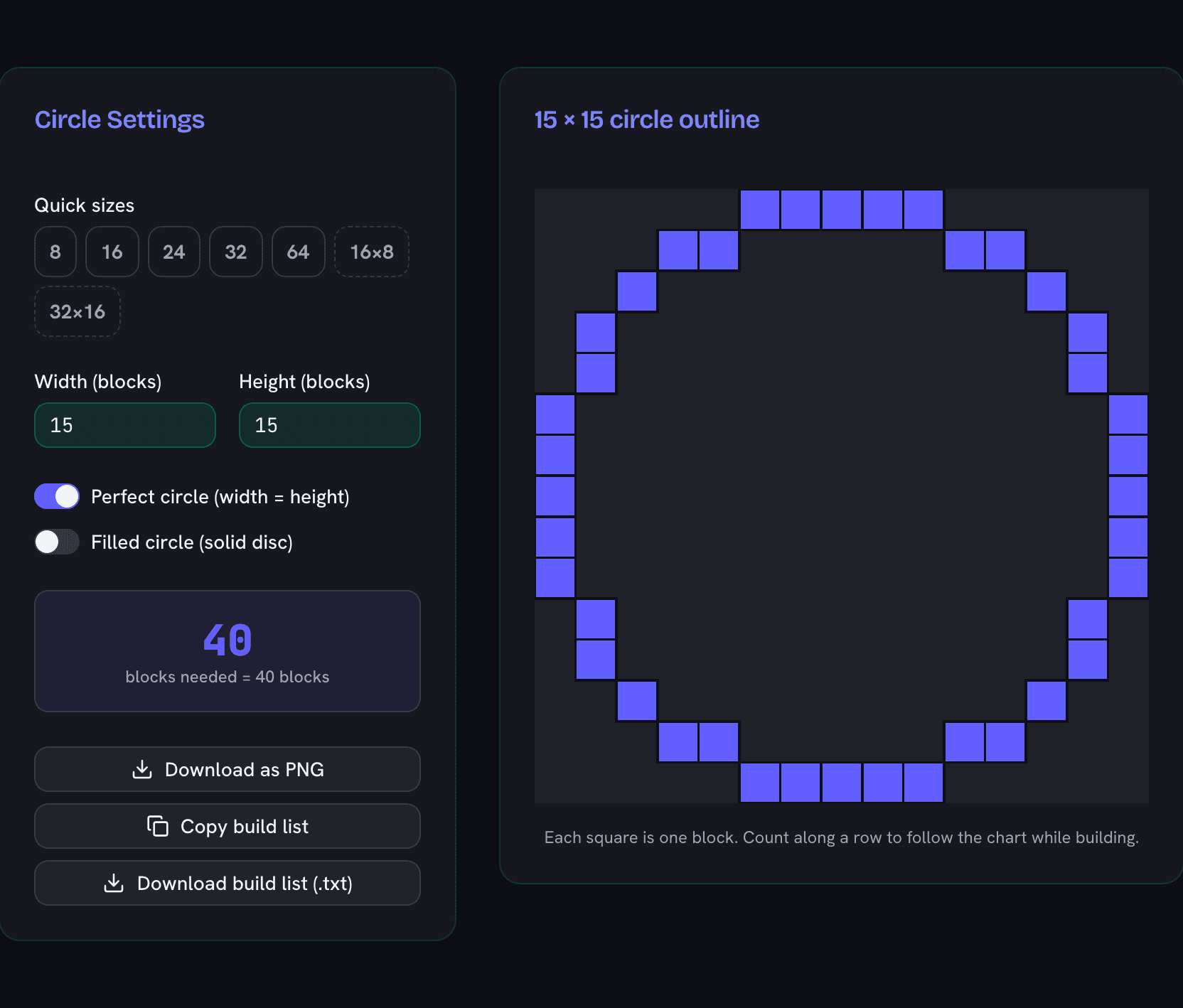
A 15×15 circle outline takes 40 blocks; filled solid it takes 177. The sizes chart on this page carries a row for every whole diameter from 3 to 36, then the landmark sizes up to 128, all computed by the generator’s own math rather than typed in by hand.

Minecraft circle generator showing a 15 by 15 pixel circle chart needing 40 blocks
A 15×15 circle outline: 40 blocks, readable row by row while you build.