lans.cloud Tools

Random Classroom Seating Chart Generator

Free random seating chart generator with rules and four room layouts — rows, groups/pods, horseshoe, circle. Keep students apart or together, exam spacing with an empty desk between students, pin students to the front, print the chart. Ad-free projector view.

Was this tool helpful?
Support this site

More tools

How to make a classroom seating chart

Six steps from a pasted class list to a printable chart that respects who cannot sit next to whom.

  1. Paste your class list

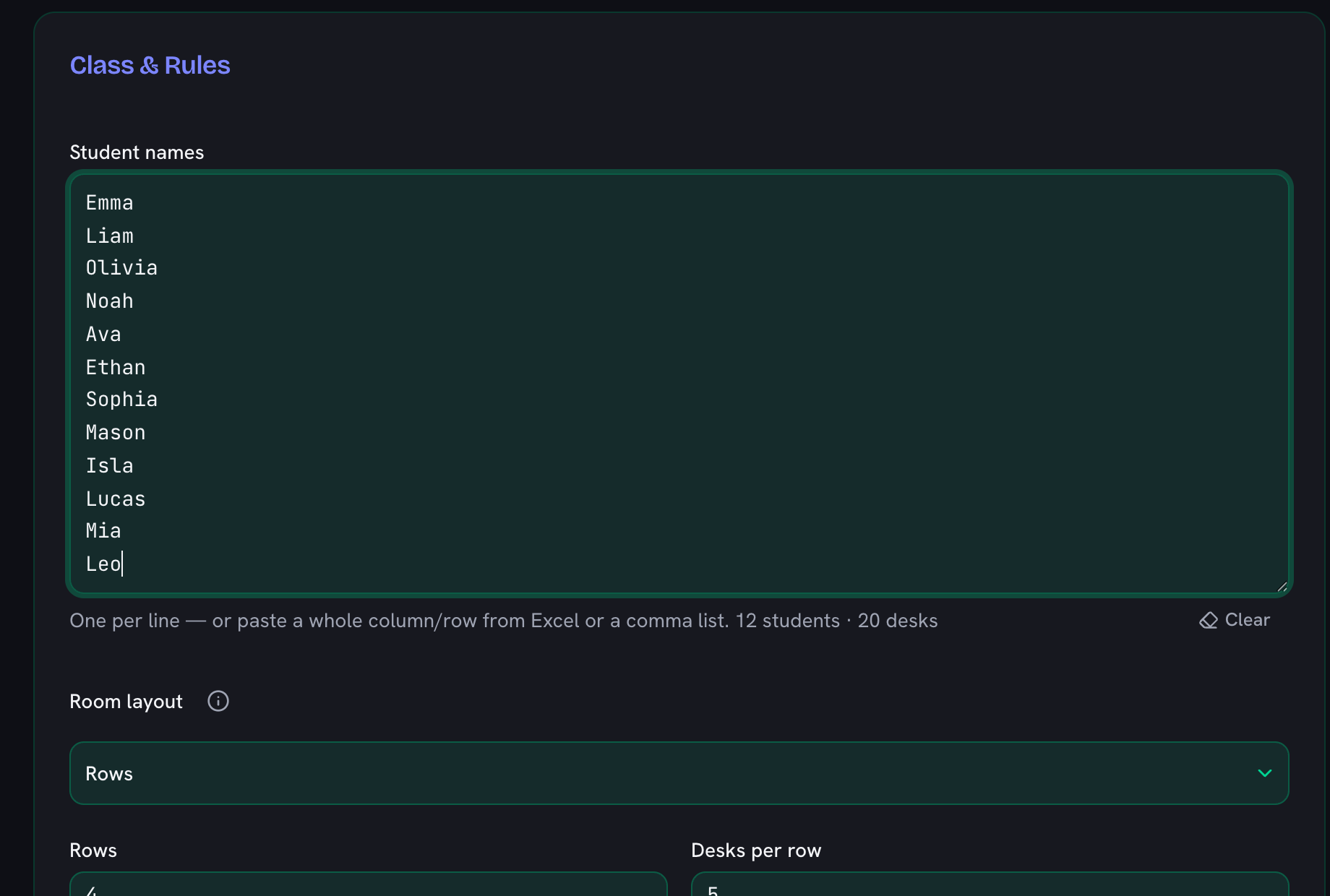
    One name per line, or paste a whole column straight out of your register spreadsheet — a comma-separated list works too. The counter under the box confirms how many students it read and whether you have enough seats for them.

    The seating chart generator class list box filled with twelve student names, above the room layout picker
  2. Describe the room

    Choose rows, groups, horseshoe or circle, then set the grid size or the number and size of the pods. Match the real furniture, because the layout is also what decides whether two students count as sitting together.

  3. Say where the empty seats should go

    When there are more seats than students, Fill seats decides what happens to the spare ones: scattered, pushed to the front or back, gathered in the middle, or every other column left empty for exam spacing.

  4. Add the rules you actually care about

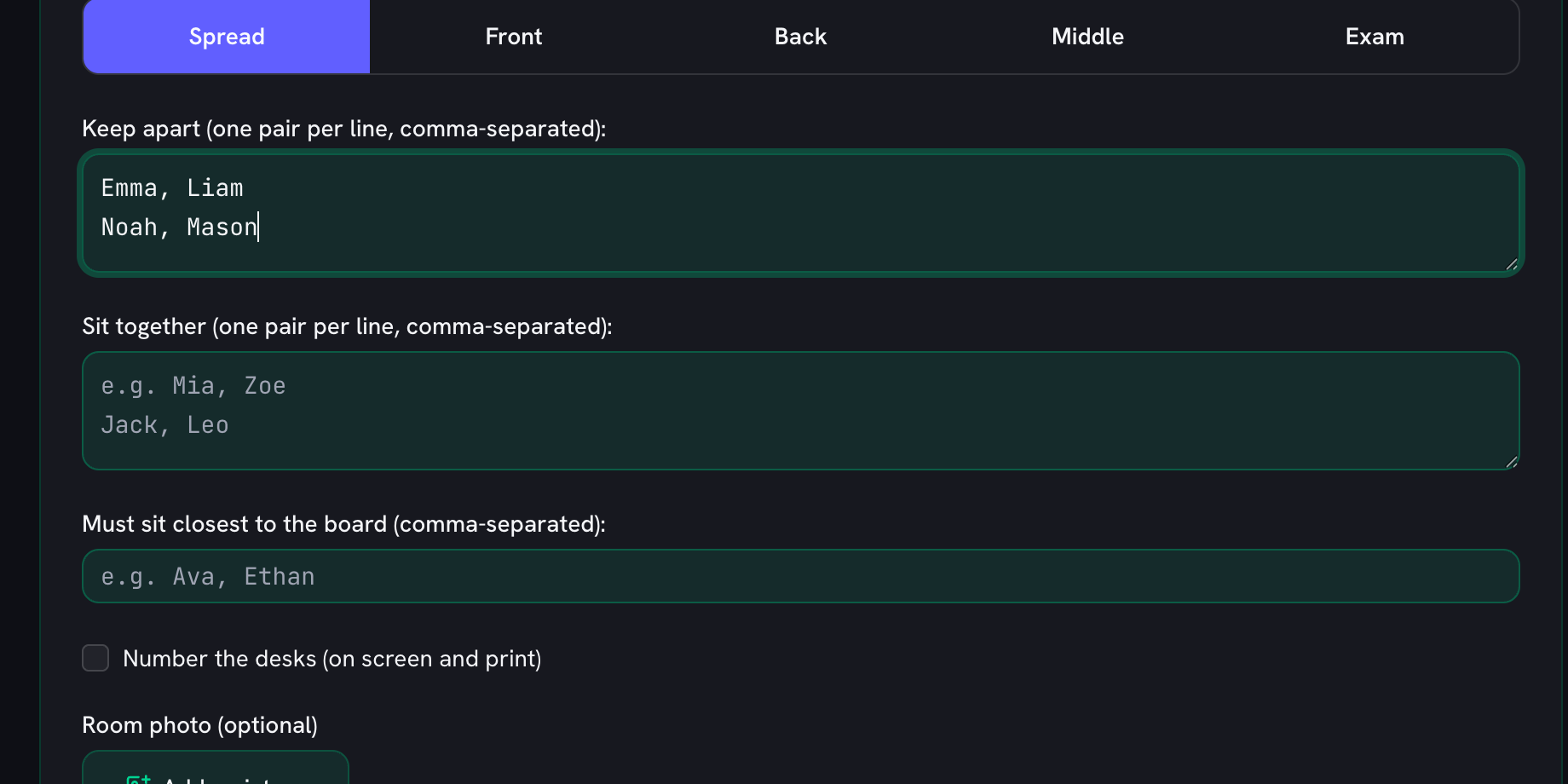
    List the pairs to keep apart, the pairs that should sit together, and anyone who needs to be closest to the board. This is the part a random shuffle cannot do, and the reason a generated chart is usable instead of just fast.

    The Keep apart box listing two pairs of students who must not sit together, one pair per line
  5. Generate, then nudge it by hand

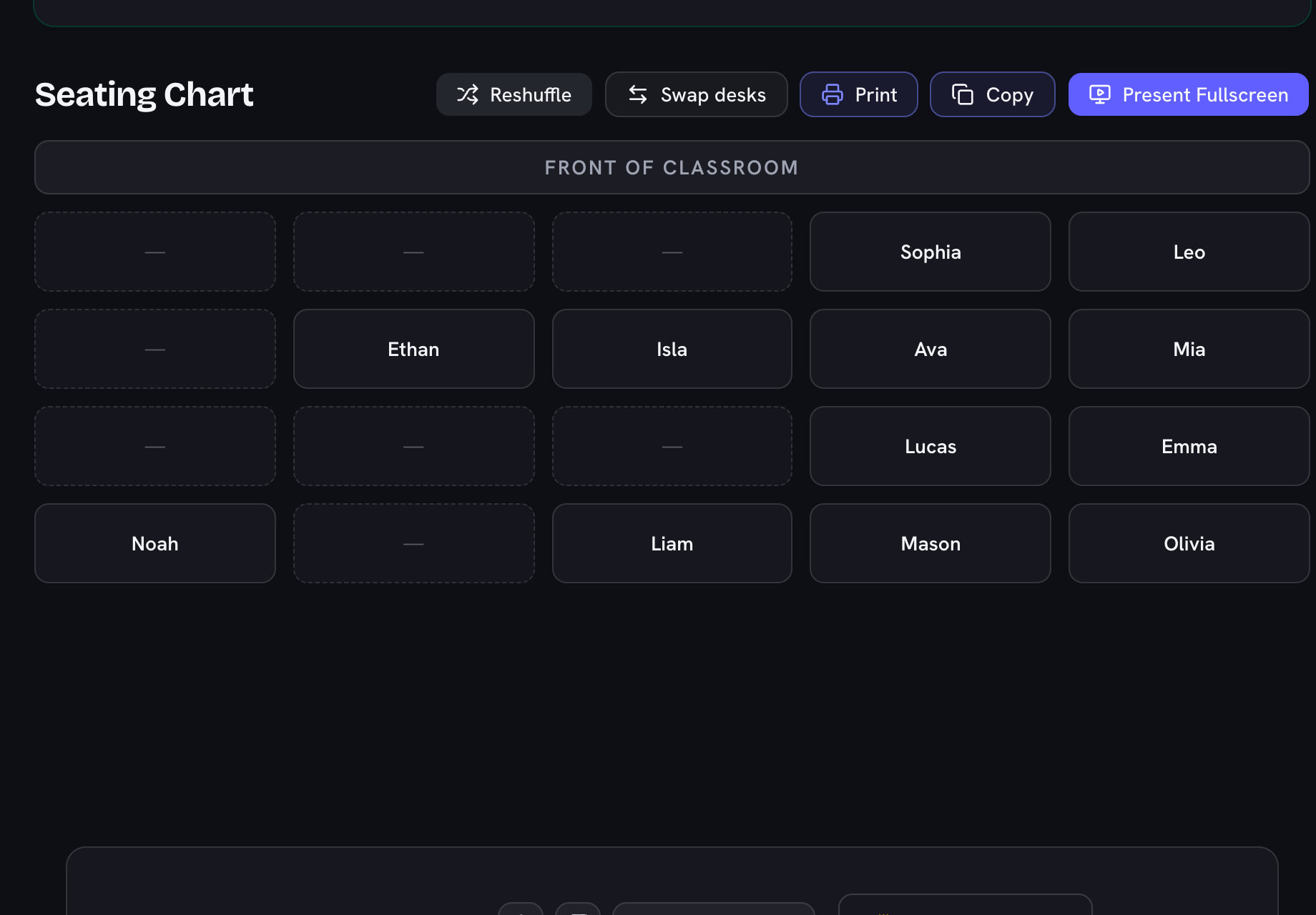
    Shuffle for a fresh arrangement that still respects every rule. If one seat is not right, swap two students directly on the chart — your manual moves are marked, and Reset puts the generated chart back.

    A generated classroom seating chart laid out in rows of desks, with Reshuffle and swap controls above it
  6. Print it or project it

    Print a copy for the desk or for a cover teacher, or use Present Fullscreen to put the chart up ad-free on the board so the class can find their seats as they come in.

A Seating Chart Generator That Understands Real Classrooms

Purely random seating charts have a flaw every teacher knows: the two students who cannot sit together always seem to land side by side. This free seating chart generator fixes that with constraints — mark pairs to keep apart, pairs who must sit together, and students who belong in the front row, pick your room shape (rows, table groups, a horseshoe, or a discussion circle), and generate. The randomizer respects every rule, and the reshuffle button gives you a fresh compliant arrangement any time.

Everything runs in your browser with no sign-up: your class list and rules are remembered locally between visits and never uploaded anywhere — which also means student names stay private on your device. The same one-per-line roster pastes straight into the random name picker and the jobs chart, so you only type your class once.

How to Create a Seating Chart in Under a Minute

  1. Paste your class list — one student per line, straight from your roster spreadsheet.
  2. Set the room shape — rows and desks per row; empty desks are fine, and Fill seats decides whether they spread out, collect at the back or front, or leave the class clustered in the middle.
  3. Add your rules — keep-apart pairs (talkers, siblings, rivals), sit-together pairs (reading buddies, peer helpers), and front-row placements (vision, hearing, focus needs).
  4. Generate, review, reshuffle — every click produces a new arrangement that honours all the rules.
  5. Fine-tune by hand — Swap desks lets you tap two desks to trade them (moved students stay marked, and one click restores the generated chart).

Why Constraint-Based Beats Purely Random

Research on classroom management is consistent: seating placement measurably affects attention and behaviour, and teacher-controlled arrangements outperform free seating. But maintaining charts by hand takes real time, and redoing one mid-term after a conflict takes more. Constraint-based generation gives you the fairness of randomness — no accusations of favourites — while quietly encoding the professional judgement only you have about who needs distance and who needs the front row.

Beyond the First Day

  • Monthly reshuffles: your list and rules are saved, so a new arrangement is one click.
  • Test seating: switch Fill seats to Exam and every other column stays empty — spaced desks for test day, with keep-apart rules still enforced on top.
  • Substitute notes: Copy exports the chart as plain text, row by row, ready to paste into sub plans.
  • Projector reveal: the ad-free fullscreen mode turns the new chart into a smooth start-of-class moment instead of a paper shuffle.
Frequently Asked Questions

Is there a free classroom seating chart maker with no sign-up?

This is one: a completely free seating chart maker (or seating plan generator, as it’s called in UK schools) with no account, no watermark, and no locked layouts. Paste your class list, pick rows, groups, or horseshoe, and generate — your classes and rules stay saved in your browser.

Can I make seating charts with groups of 4, a horseshoe, or a circle?

Yes — pick the Room layout: classic Rows, Groups (2–10 pods of 2–6 seats, ideal for table work), Horseshoe (one U facing the middle), or Circle (a full closed ring for circle time and discussions). The rules adapt to the layout: in Groups, “keep apart” means different pods; in the Horseshoe and Circle it means not side-by-side — and the circle wraps around, so the first and last seats count as neighbours; “closest to the board” means the front row, the first pod, or the seats nearest the board.

Can I make an exam seating chart with an empty desk between students?

Yes — in the Rows layout, switch Fill seats to Exam and every other column stays empty, the way real test rooms space desks. Keep-apart rules still apply on top, and if the class doesn’t fit the spaced desks the generator says exactly how many columns or rows to add.

Can I fill desks from the front, the back, or the middle?

Yes — when you have more desks than students, Fill seats controls where the empties go: Spread scatters them naturally, Front packs the class toward the board, Back fills from the back wall, and Middle keeps everyone close together in the center of the room. Placement stays random within the filled rows.

Can I make two students sit next to each other?

Yes — add them as a pair in the “Sit together” box, one pair per line, like “Mia, Zoe”. They are guaranteed adjacent desks (or the same pod in the Groups layout) — handy for reading buddies, peer helpers, or a translator partner. Sit-together and keep-apart rules work at the same time, and the generator warns you if the same pair is in both.

Can I paste my class list from Excel or Google Sheets?

Yes — paste a whole column or row straight in. The name box accepts one name per line as well as comma-, semicolon-, and tab-separated lists, and drops duplicates automatically.

Can I print the seating chart?

One click on Print opens a clean page with just the chart — big bordered desks, the “front of classroom” marker, and none of the website around it. It fills whatever paper you pick (portrait or landscape — wide grids look best in landscape), and desks never get cut in half across pages. Turn on desk numbers and every seat gets a small printed number too (“move to desk 12” works even with a substitute). Print it for a sub or tape it to the door on day one.

Can I add a photo of my classroom to the seating chart?

Yes — add an optional Room photo and it prints in the top corner just above the “front of classroom” marker, labelled “The room”, so a substitute teacher can match the printed seating chart to the real room at a glance. The photo is used only for that printout: it stays on your device, is never uploaded, and is never saved with your class — pick it again next time you print.

How do I keep two students from sitting together?

Add them as a pair in the "Keep apart" box — one pair per line, like "Emma, Liam". The generator guarantees they never end up in adjacent desks, including diagonals, and you can add as many pairs as you need.

Can I make certain students sit in the front row?

Yes. List their names in the "Must sit in the front row" field (comma-separated) — useful for students with glasses, hearing needs, IEP accommodations, or those who focus better up front. They are always placed in row 1; everything else stays random.

Can I save seating charts for more than one class?

Yes — save each class by name ("3B", "Year 5 maths") and the whole room comes back in one click: the roster, the keep-apart and front-row rules, the generated chart, and any manual desk swaps. Everything stays in your own browser; nothing is uploaded.

What happens if my rules are impossible?

The generator tells you instead of silently breaking a rule — for example when two keep-apart students cannot avoid each other in a tiny grid. Add a row or column, or relax one pair, and regenerate.

Can I project the seating chart without ads?

Yes. Click Present Fullscreen for a clean, ad-free view of just the chart with big readable name cards — made for projectors and smartboards on the first day of a new arrangement.

Does it save my class list?

Your class list, grid size, and rules are stored in your own browser, so next month’s reshuffle takes one click. Nothing is uploaded — student names never leave your device.

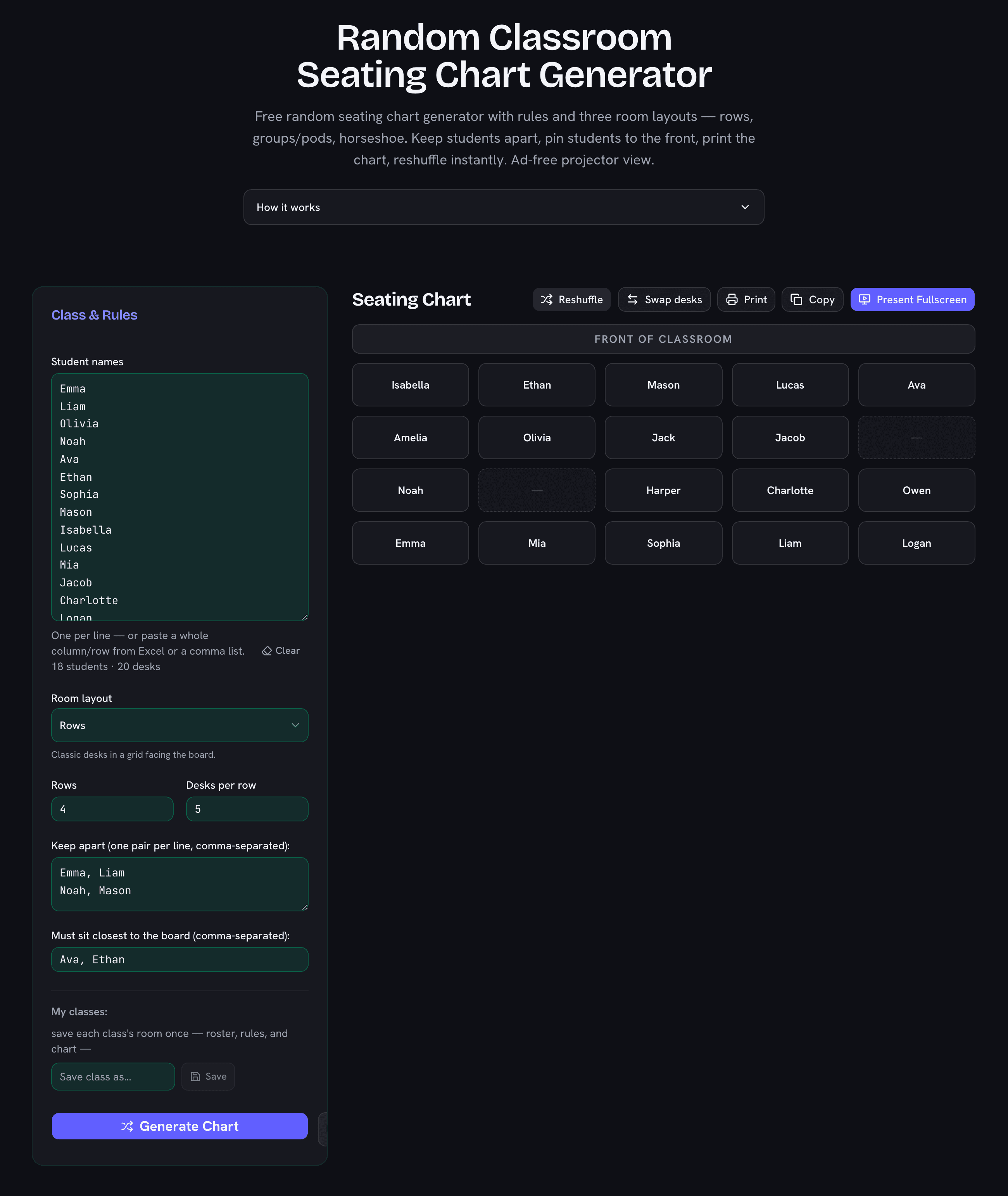
Classroom seating chart generator showing a generated desk grid with keep-apart rules and front-row placement applied
A generated chart: keep-apart pairs separated, front-row students pinned, empty desks spread naturally.